- Languages :


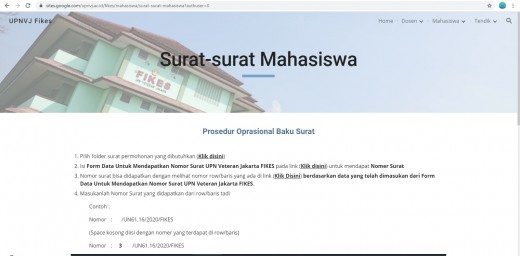
1. 1. Select the required application letter folder (Click here)
2. Fill out the Data Form to obtain the UPN Veteran Jakarta FIKES letter number (Click here)
3. Check the row number in the link (Click here) to obtain the letter number based on the data that has been entered
4. Enter the UPN Veteran Jakarta FIKES letter number obtained from the previous row
Enter the letter number obtained from the previous row
Example :
Number : /UN61.16/2020/FIKES
(Empty spaces are filled with numbers in the row)
Number : 3 /UN61.16/2020/FIKES
Please click the link below and see the tutorial on the link
https://sites.google.com/upnvj.ac.id/fikes/mahasiswa/surat-surat-mahasiswa?authuser=0
1. Make a copy of the file (00 PLEASE DUPLICATE AND CHANGE NAME) by right-clicking make a copy in the folder of the selected letter category
2. Rename a copy of the file to the Mail Name format: (Letter number)-Name
Example : (3/UN61.16/2020/FIKES)-Anjas Andi
Note : This name format is used to make it easier for us to check. Please follow the instructions properly.
3. Open the letter that has been renamed using google docs
4. Fill in the letter according to the relevant data
NOTE :
1. If the letter does not have a letter number, then the letter is considered invalid Example of a valid digital letter (Click Here)
2. Due to most agencies/companies conducting WFH as a result of the Covid-19 pandemic, the letter was not signed and stamped. Enough with the letterhead and registration number.
3. If there is an agency that requires/requires a wet stamp signature, the student must coordinate and adjust with the study program admin based on the attendance picket of the authorized official.
Daftar sekarang untuk menerima berita terkini, lowongan kerja, dan informasi lainnya.